

 HANDS ON SharePoint
 HANDS ON Teams
 HANDS ON Lists
 HANDS ON tek
 M365 Admin
Microsoft Purview | Insider Risk Management – Ability to preview content in Insider Risk Management Alerts
Microsoft Purview Insider Risk Management will add a content preview tab in alerts, allowing investigators to view supported SharePoint, OneDrive, and Exchange content without creating cases. Rolling out April to July 2026, this feature is enabled by default for licensed tenants and requires no action to enable.

We’re adding the ability to preview content directly within Insider Risk Management (IRM) alerts in Microsoft Purview. This enhancement removes the need to create a case to view potentially risky content, helping investigators quickly evaluate alerts and accelerate triage. This feature aligns with customer feedback requesting faster, more streamlined investigation workflows.
This message is associated with Microsoft 365 Roadmap ID 557189.
When this will happen:
- Public Preview: Rolling out in early April 2026 and expected to complete by late April 2026.
- General Availability (Worldwide, GCC, GCC‑High, DoD): Rolling out in mid‑June 2026 and expected to complete by late July 2026.
How this affects your organization
Who is affected:
- Organizations using Microsoft Purview Insider Risk Management.
- Only users with Investigator permissions will have access to content preview.
What will happen
- A new Content preview tab will appear within activity details in IRM alerts:
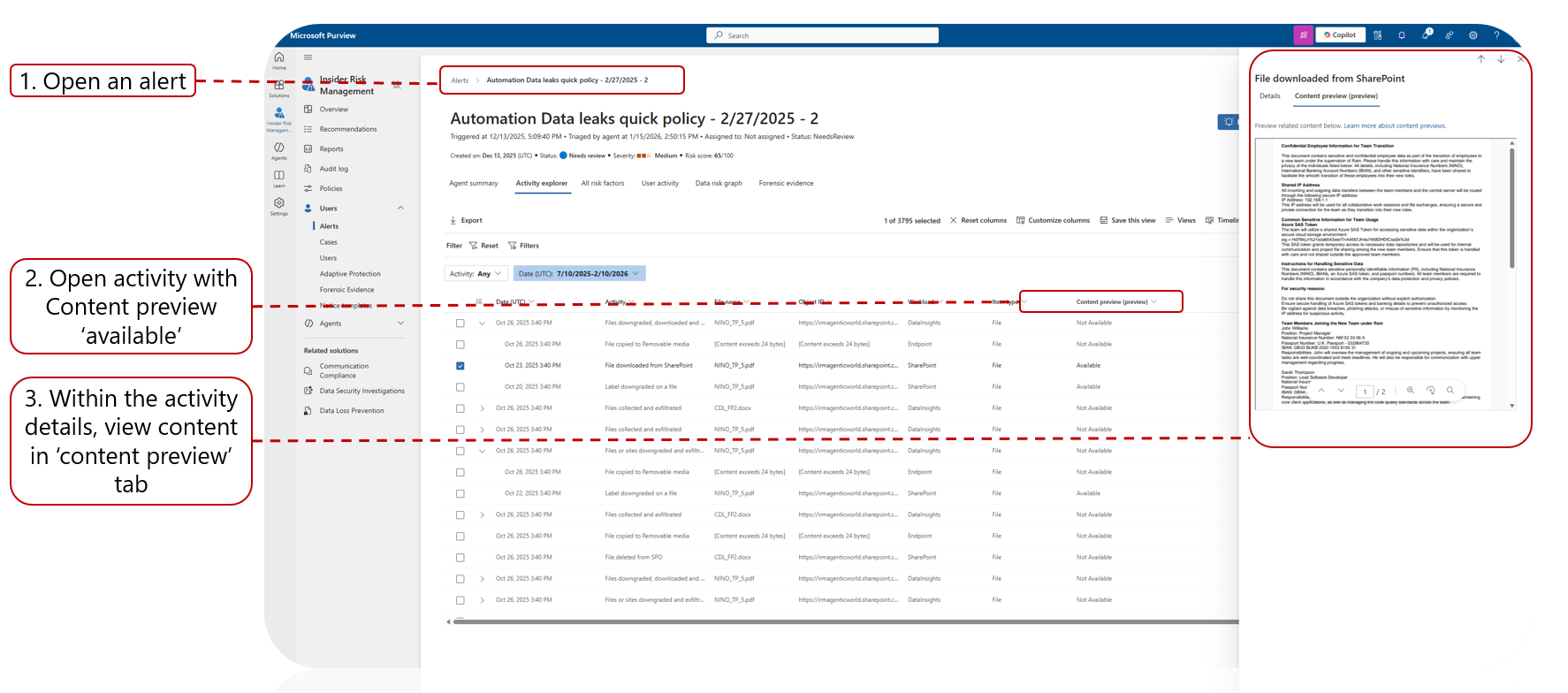
- Investigators will be able to view supported content directly from the alert without creating a case.
- Supported activity types include:
- Viewing, downloading, syncing, or sending activities involving content from SharePoint, OneDrive, or Exchange.
- Unsupported activity types include:
- State changes, permissions changes, deletions, and Endpoint activities.
- The feature is enabled by default for tenants licensed for Insider Risk Management.
- No impact on end‑user experience outside of investigators handling alerts.
What you can do to prepare
No action is required to enable this feature.
If your organization uses IRM for investigations, you may want to:
- Confirm which users hold Investigator permissions.
- Update internal investigation workflows or playbooks to reflect new alert‑level content preview.
- Inform your security operations or compliance teams of the new capability.
- Review supported content preview scenarios documented here:
- Learn more about investigating alerts in Insider Risk Management.
- To use content preview when available:
- Navigate to Insider Risk Management.
- Open Alerts.
- Select an alert.
- Open an activity marked as content preview available.
- View content in the Content preview tab.
Learn more: Investigate Insider Risk Management activities | Microsoft Purview | Microsoft Learn
Compliance considerations
No compliance considerations identified. Review as appropriate for your organization.
Message ID: MC1244281





