

 HANDS ON SharePoint
 HANDS ON Teams
 HANDS ON Lists
 HANDS ON tek
 M365 Admin
Create Excel spreadsheets from Copilot Notebook content
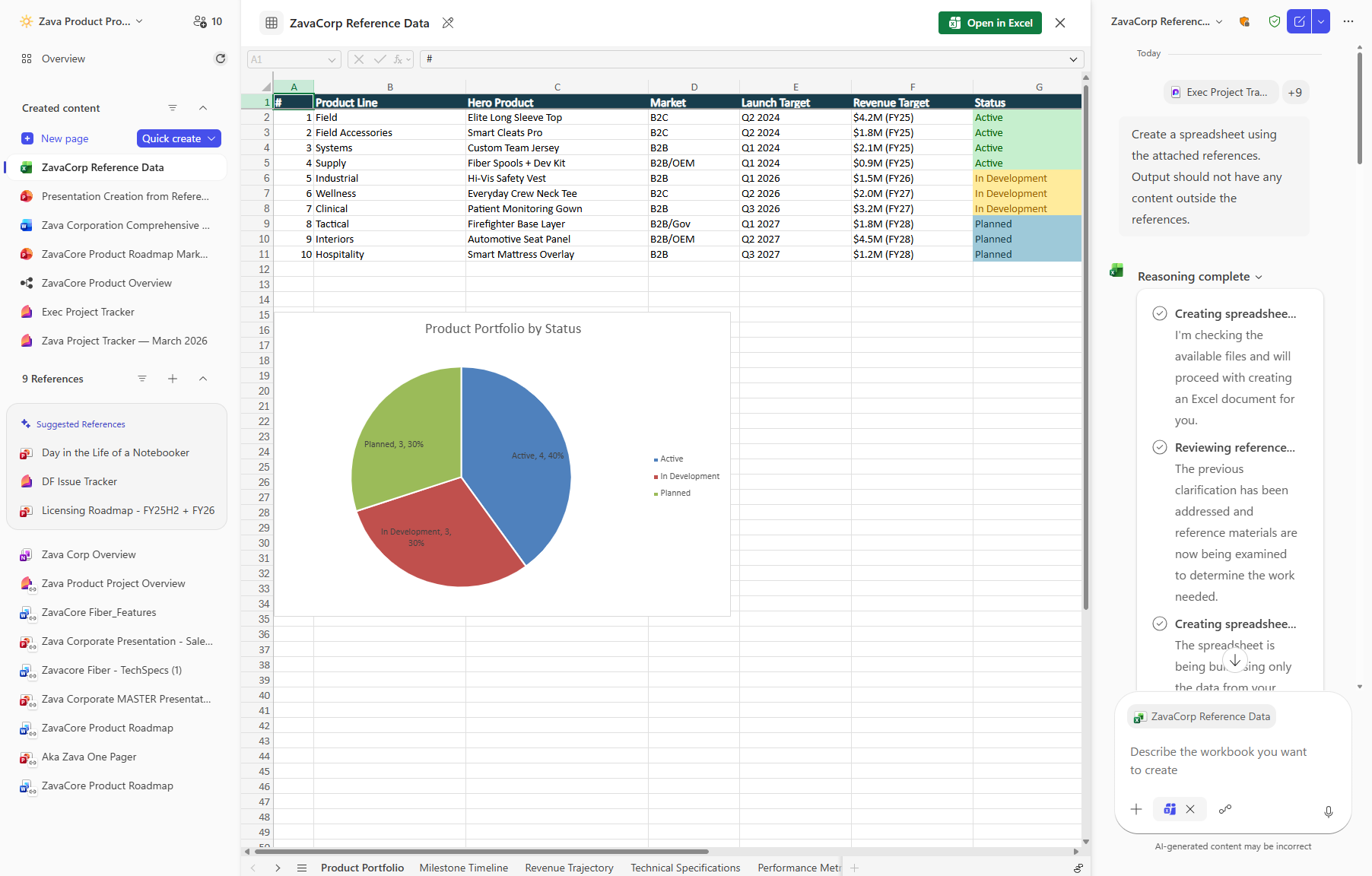
Copilot Notebooks will enable users with a Microsoft 365 Copilot (Premium) license to generate and edit Excel spreadsheets directly from notebook content. This feature rolls out in public preview from late March to April 2026 and general availability in late May 2026, with no admin action required.

Introduction
Copilot Notebooks enables users to generate Excel spreadsheets directly from the content and references collected in a notebook. Copilot creates a structured spreadsheet based on the notebook’s context, which can then be opened and edited in Excel. This capability streamlines the transition from ideas and source material into a usable spreadsheet by reducing manual setup and formatting.
When this will happen:
- Public Preview via Frontier: Rollout begins in late March 2026 and is expected to complete by late April 2026.
- General Availability (Worldwide): Rollout begins in late May 2026 and is expected to complete by late May 2026.
How this affects your organization:
Who is affected:
- Users with access to Microsoft Copilot and Copilot Notebooks
- Organizations using Excel in Microsoft 365
- A Microsoft 365 Copilot (Premium) license is required to use this feature
What will happen:
- Users will be able to generate an Excel spreadsheet from content and references stored in a Copilot Notebook.
- The generated spreadsheet opens in Excel and can be edited like any other Excel file.
- The feature is enabled by default for eligible users.
- Existing Microsoft 365 security, compliance, and Copilot policies are respected.
What you can do to prepare:
Compliance considerations:
- No admin action is required.
- Review internal guidance or helpdesk documentation related to Copilot and Excel workflows.
- Consider notifying users that Copilot Notebooks can now generate Excel spreadsheets from notebook content.
Learn more: Get started with Microsoft 365 Copilot Notebooks | Microsoft Support (will be updated before rollout)
| Compliance question | Explanation |
|---|---|
| Does the change alter how existing customer data is processed, stored, or accessed? | Copilot processes existing content and references stored in a Copilot Notebook to generate a structured Excel spreadsheet. This processing occurs within Microsoft 365 services and respects existing security, compliance, and data residency boundaries. |
| Does the change introduce or significantly modify AI/ML capabilities that interact with customer data? | This change introduces a Copilot capability that uses generative AI to analyze notebook content and create an Excel spreadsheet based on that context. |
| Does the change provide end users any new way of interacting with generative AI? | Users can instruct Copilot to generate Excel spreadsheets directly from Copilot Notebook content, representing a new generative AI–assisted interaction within Microsoft 365. |
Message ID: MC1262567





