

 HANDS ON SharePoint
 HANDS ON Teams
 HANDS ON Lists
 HANDS ON tek
 M365 Admin
Microsoft 365 Copilot: Discover Copilot actions in OneDrive/SharePoint file preview
Starting late April 2026, Microsoft 365 Copilot will show suggested actions like summarizing and FAQ generation directly in OneDrive and SharePoint file previews. Enabled by default for eligible users, this feature respects existing permissions and policies, requiring no admin action but user awareness is recommended.

Introduction
We are improving how users discover Microsoft 365 Copilot capabilities in the file previewer of OneDrive and SharePoint. Ready to use Copilot actions will appear directly in the file preview experience, alongside the Copilot button. When users preview supported files, suggested prompts will help them complete common tasks such as summarizing documents, generating FAQ, and extracting key information without writing their own prompts.
When this will happen
General Availability (Worldwide): We will begin rolling out in late April 2026 and expect to complete the rollout by early May 2026.
How this affects your organization
Who is affected
- Microsoft 365 tenants using OneDrive for Business
- Users who have access to Microsoft 365 Copilot
- Administrators managing OneDrive and Copilot experiences
What will happen
- Users will see suggested Copilot actions when previewing supported files in OneDrive:
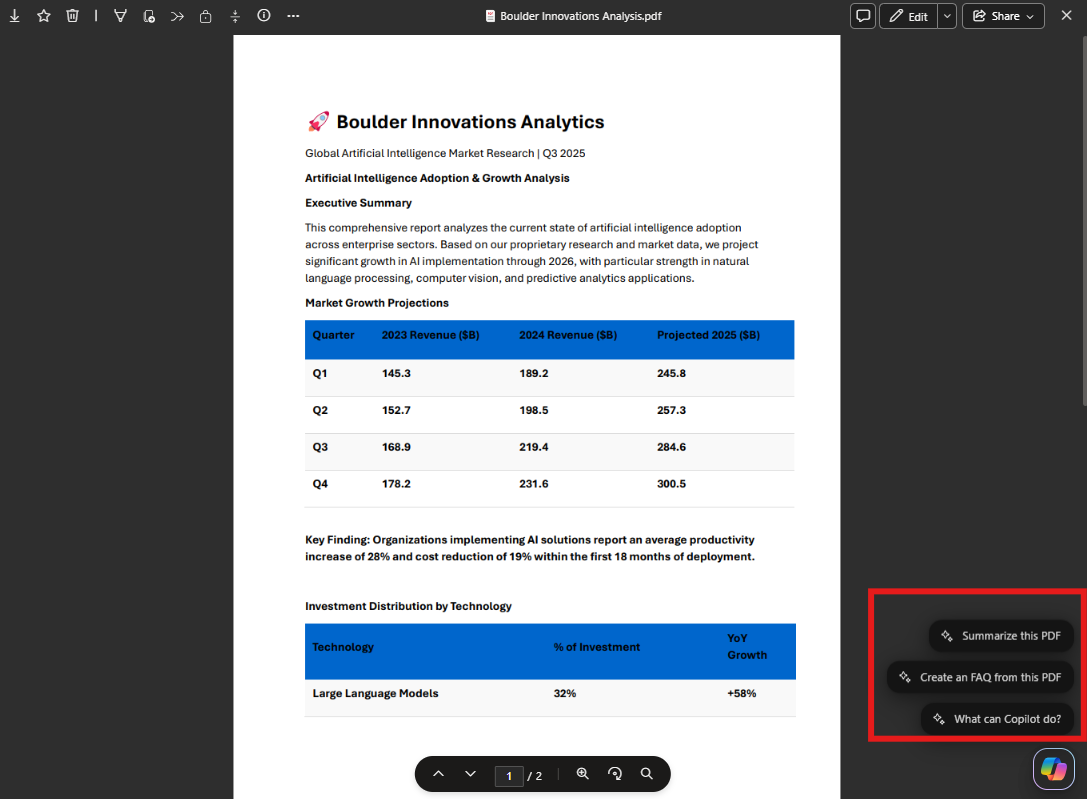
- Suggested actions may include summarizing content, generating FAQ, and identifying key points.
- The feature will be enabled by default for eligible users. Suggestions will disappear after a timeout or after a user interacts with a file.
- Existing Copilot, OneDrive, SharePoint, and Microsoft Purview policies will continue to apply.
- There will be no change to file permissions, sharing behavior, or data residency. Copilot will continue to respect existing access controls and Microsoft Purview policies.
What you can do to prepare
- No admin action is required.
- Consider notifying users that Copilot suggestions will appear in OneDrive file previews to support awareness and adoption.
- If Copilot is disabled or restricted in your tenant, those settings continue to apply.
Compliance considerations
| Question | Answer |
| Does the change alter how existing customer data is processed, stored, or accessed? | Yes. Copilot processes existing OneDrive or SharePoint file content to generate responses, consistent with current Copilot behavior and user permissions. |
| Does the change introduce or significantly modify AI or ML capabilities that interact with customer data? | Yes. The change introduces new in context Copilot prompts that guide user interaction with existing generative AI capabilities. |
| Does the change provide a new way for users to interact with generative AI? | Yes. Users can initiate Copilot actions directly from the OneDrive or SharePoint file preview using suggested prompts. |
Message ID: MC1281507





