HANDS ON SharePoint
 HANDS ON Teams
 HANDS ON Lists
 HANDS ON tek
 M365 Admin
Dynamics 365 Field Service: Optimize schedules with Scheduling Operations Agent
The Scheduling Operations Agent for Dynamics 365 Field Service enables dispatchers to quickly and easily optimize schedules for technicians as conditions change throughout the workday, so they can significantly improve their productivity. Dispatchers can ask Copilot to optimize schedules and address issues such as traffic delays, double bookings, or last-minute cancellations that often result in conflicts, gaps, or idle time in a technician’s schedule. Instruct Copilot to achieve the desired business objective, such as maximizing technician usage or work order priority while considering factors like skillset match, territories, and promised time windows.

Dispatchers often spend considerable time and energy reviewing and adjusting each technician’s schedule as conditions change throughout the workday:
- A technician has one or more cancellations in the afternoon. To fill the open slots, what requirements optimally keep promise windows, prefer high-priority work, and locate work around the same neighborhoods that the technician is due to travel to?
- A technician is running over the planned time for the current booking. As a result, they’re late for the next booking, and the delay might cascade to subsequent bookings. How do you best adjust the bookings for the remainder of the day?
- A technician recovers from illness sooner than expected and is now available for work earlier than planned. What’s the best way to schedule work for them when they return?
- A technician’s schedule contains a lot of low-priority work that isn’t due for weeks. How can you improve the schedule with work that better meets desired business goals?
- A technician’s schedule for the day is built manually or with the schedule assistant. How can you rearrange the schedule so that the resource’s travel time is reduced?
In each case, the dispatcher needs to assess the situation, determine which business goals apply, and then update the schedule manually, one booking at a time.
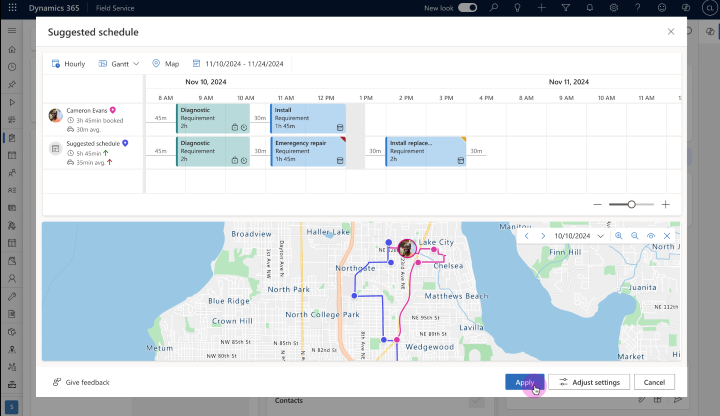
With this release of the Scheduling Operations Agent, dispatchers can ask Copilot to provide the best schedule for the affected technician. Within seconds, the dispatcher gets a suggested schedule for review and can apply the updates.
You can direct Copilot to optimize for the business goal you want, such as maximizing technician usage or work order priority. Copilot intelligently chooses among existing bookings and new unfulfilled work orders based on factors like skillset match, territories, and customer promise windows. Users can access the feature from the Copilot side pane anywhere within the Dynamics 365 Field Service application.
Enabled for: