

 HANDS ON SharePoint
 HANDS ON Teams
 HANDS ON Lists
 HANDS ON tek
 M365 Admin
Microsoft Teams: Allow meeting participants to create Collaborative notes
Currently, only Microsoft Teams meeting organizers can create Collaborative notes before and after meetings. We are rolling out enhanced Collaborative notes that allow any meeting invitee to create notes before, during, and after the meeting. This enhancement helps to improve collaboration and efficiency and provides a seamless teamwork experience.
This message is associated with Microsoft 365 Roadmap ID 374515.

When this will happen:
Targeted Release: We will begin rolling out late January 2024 and expect to complete by early February 2024.
Standard Release: We will begin rolling out mid-February 2024 and expect to complete by late February 2024.
How this will affect your organization:
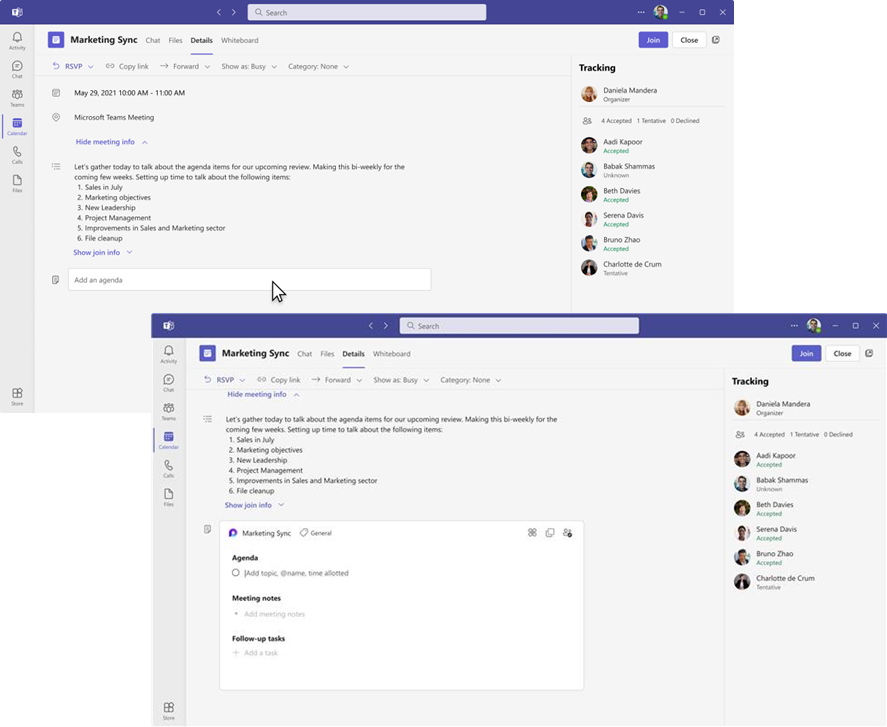
In the Teams app, meeting invitees can add what they want to discuss (Agenda), what they discuss (Meeting notes), and what they need to follow up on (Follow-up tasks) on the Teams calendar meeting details page before, during, and after meetings. However, only meeting organizers can hide the notes once created. The Meeting notes will be shown on the right pane of the meeting window, and they can be opened in the browser or on a second monitor. Participants can continue real-time collaboration in meetings. When participants are assigned a task, they will also receive an email notification, synced with Planner and To Do apps.
After the meeting, Collaborative notes will be accessible for all participants on the Teams calendar meeting details page. The Agenda, Meeting notes, and Follow-up tasks are a Loop component, so they can be copied easily into chats, group chats, emails, and other documents.
You can manage this feature via Microsoft SharePoint PowerShell with:
Set-SPOTenant -IsCollabMeetingNotesFluidEnabled (boolean)
Learn more about admin controls for managing Loop experiences: Manage Loop workspaces in SharePoint Embedded | Microsoft Learn
What you need to do to prepare:
No action is needed to prepare for this change. You may want to notify your users about this change and update any relevant documentation as appropriate.
Message ID: MC708499






No comments yet