

 HANDS ON SharePoint
 HANDS ON Teams
 HANDS ON Lists
 HANDS ON tek
 M365 Admin
Microsoft Teams: Let customers book appointments directly from your website using the Customer Connect widget
Microsoft Teams Customer Connect will add appointment booking via a website widget, allowing customers to schedule meetings that sync with staff Outlook calendars and Teams channels. Rolling out worldwide in May 2026, admins must enable and configure this feature for up to 25 support agents per tenant.

We’re enhancing Customer Connect in Microsoft Teams by adding appointment booking, enabling customers to book follow-up meetings directly from your business website. This helps small businesses turn website conversations into scheduled consultations and ensures appointments are automatically managed in Teams and staff calendars.
This message is associated with Microsoft 365 Roadmap ID 557172.
When this will happen:
- General Availability (Worldwide): We will begin rolling out in early May 2026 and expect to complete by early May 2026
- General Availability (GCC): We will begin rolling out in early May 2026 and expect to complete by late May 2026
How this affects your organization:
Who is affected:
- Microsoft 365 tenants using Customer Connect in Microsoft Teams
- Customers licensed for Microsoft 365 Business Basic, Business Standard, or Business Premium
- Teams administrators who manage Customer Connect settings
What will happen:
- Website visitors can schedule appointments directly through the embedded Customer Connect widget.
- Scheduled appointments are automatically:
- Added to the assigned staff member’s Outlook calendar
- Posted to the Customer Connect requests channel with appointment details
- No changes occur to the existing Customer Connect experience until an admin enables and configures appointment scheduling.
- Each tenant can assign up to 25 users as Customer Connect support agents.
- Note: Customer Connect was previously released under the name Live Chat in Teams. Documentation may refer to both names while the naming transition is in progress. Refer to MC1287369 for more information.
What you can do to prepare:
- Set up Customer Connect in Microsoft Teams if not already configured. Learn more: Set up and manage live chat | Microsoft Learn.
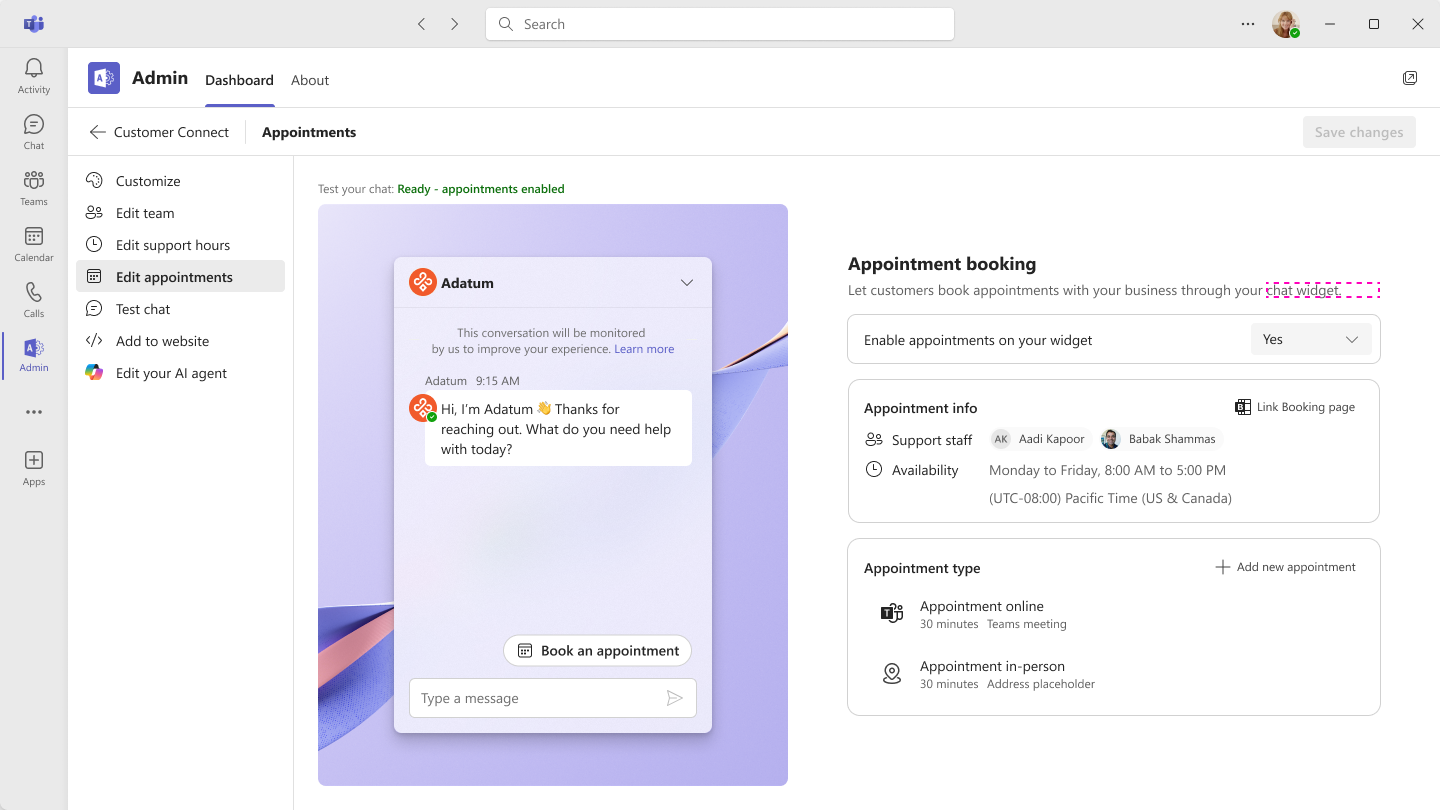
- Enable appointment scheduling from the Teams Admin app.
- Configure appointment settings, including:
- Adding or removing staff eligible for appointments
- Defining staff availability hours
- Creating, editing, or removing appointment types offered to customers
- Review internal support processes and update documentation or helpdesk guidance as needed.
Screenshot: Admin enables Customer Connect appointment scheduling and assigns staff availability:
Compliance considerations:
No compliance considerations identified, review as appropriate for your organization.
Message ID: MC1288532





