

 HANDS ON SharePoint
 HANDS ON Teams
 HANDS ON Lists
 HANDS ON tek
 M365 Admin
Microsoft Teams: Quick access to read items while using unread only mode
Microsoft Teams will introduce an eye icon in unread only mode to quickly access read chats and channels without changing filters. Rolling out worldwide from early to mid-May 2026, this feature is enabled by default, requires no admin action, and improves navigation while keeping the unread list visible.

Introduction
To help users stay focused while working in unread only views, Microsoft Teams is introducing a quicker way to access read chats and channels without changing filters. This update improves navigation and reduces friction when users need to quickly reference previously read conversations while keeping their unread list visible.
This message is associated with Microsoft 365 Roadmap ID 559608.
When this will happen
- General Availability (Worldwide): We will begin rolling out in early May 2026 and expect to complete by mid-May 2026.
How this affects your organization
Who is affected
- Users who filter their chat or channel list to unread only mode in Microsoft Teams
What will happen
- When a section is set to unread only, users will see an eye icon next to the section name.
- Selecting the eye icon opens a list of read chats or channels within that section:
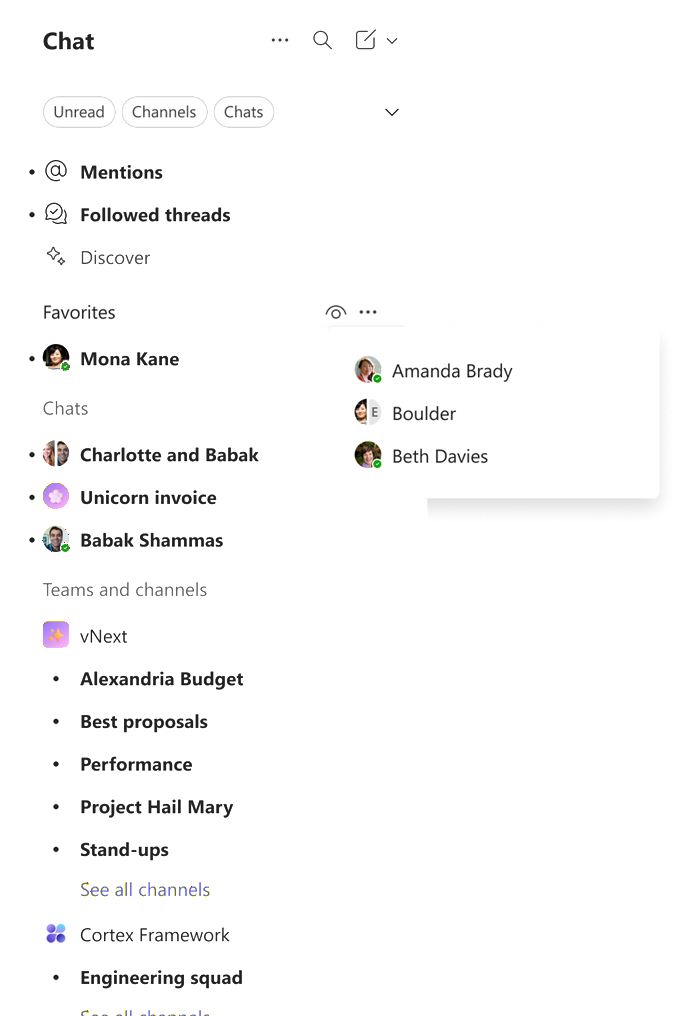
- Users can open read items directly from this list without switching out of unread only view.
- This replaces the previous experience where read items were accessed through a see read button in the chat list.
- The feature is enabled by default and requires no admin configuration.
What you can do to prepare
Compliance considerations
- No admin action is required.
- Consider notifying users about the updated navigation experience to reduce confusion and help desk inquiries.
- Update internal documentation or training materials if you reference unread only views in Teams.
No compliance considerations identified. Review as appropriate for your organization.
Message ID: MC1274550





