

 HANDS ON SharePoint
 HANDS ON Teams
 HANDS ON Lists
 HANDS ON tek
 M365 Admin
Outlook: Support for storing S/MIME certificates in contacts in new Outlook
The new Outlook for Windows will support storing S/MIME certificates directly in Contacts, enabling encrypted emails and continuity from classic Outlook. This feature rolls out worldwide mid-May 2026, requires no admin setup, and improves secure communication for organizations using S/MIME encryption.

The new Outlook for Windows now allows users to store S/MIME encryption certificates directly within Contacts. This capability enables users to save recipients’ public certificates and use them to send S/MIME encrypted emails, improving secure communication and continuity when transitioning from classic Outlook for Windows (Win32). Certificates previously stored in Contacts in classic Outlook will automatically be available in new Outlook.
This message is associated with Microsoft 365 Roadmap ID 518288.
When this will happen:
- General Availability (Worldwide): We will begin rolling out in mid-May 2026 and expect to complete by late May 2026.
- General Availability (GCC): We will begin rolling out in early June 2026 and expect to complete by late June 2026.
How this affects your organization:
Who is affected:
- Users of new Outlook for Windows
- Organizations that use S/MIME encryption
What will happen:
- Users can store recipients’ S/MIME public certificates directly in Contacts.
- Stored certificates can be used to encrypt outgoing email to those recipients.
- Certificates saved in Contacts in classic Outlook (Win32) will automatically carry over.
- Feature is available by default; no admin configuration required.
- No impact to users who are not using new Outlook for Windows.
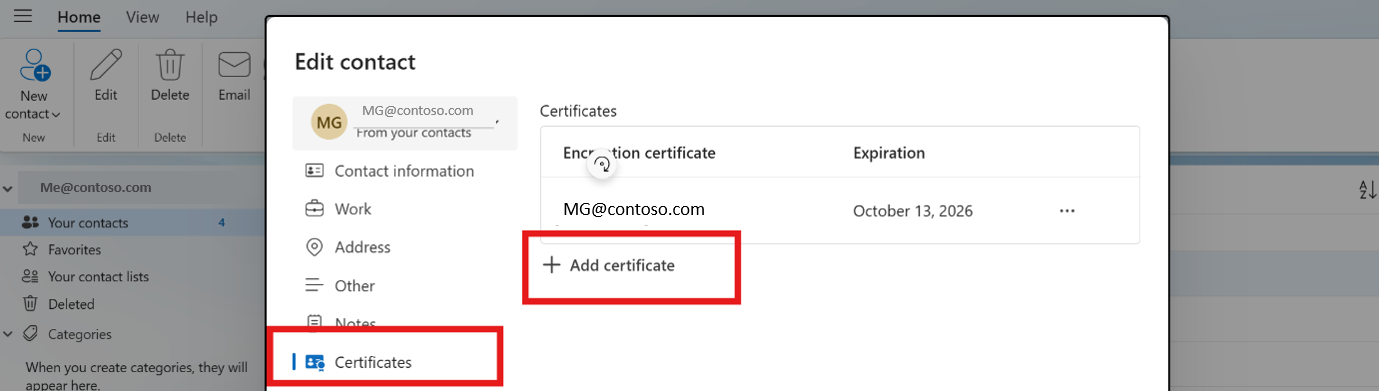
Screenshot: To add a S/MIME certificate, go to Your contacts > Certificates > Add certificate:
What you can do to prepare:
- No admin action is required to enable this feature.
- If your organization uses S/MIME:
- Instruct users to add or import S/MIME public certificates into Contacts.
- Communicate how to select S/MIME encryption when composing emails. Learn more: Send S/MIME or Microsoft Purview encrypted emails in Outlook | Microsoft Support.
- Update internal documentation for users transitioning from classic Outlook.
- Inform helpdesk teams of this improved certificate handling experience.
Compliance considerations:
| Area | Explanation |
| Does the change store new customer data? | Classic Outlook already has this capability, and we are bringing it to new Outlook as well. S/MIME public certificates can now be stored in Outlook Contacts; these persist as part of contact data. |
| Does the change alter how existing customer data is processed, stored, or accessed? | Existing certificates stored in classic Outlook Contacts are now accessible in new Outlook, improving continuity. |
Message ID: MC1302908





