HANDS ON SharePoint
 HANDS ON Teams
 HANDS ON Lists
 HANDS ON tek
 M365 Admin
SharePoint: Configure Navigation Links to Open in a New Tab
With this update, users will be able to manage the experience for each navigation item to open in a new tab.
This message is associated with Microsoft 365 Roadmap ID 93318


With this update, users will be able to manage the experience for each navigation item to open in a new tab.
This message is associated with Microsoft 365 Roadmap ID 93318
Defender for Cloud Apps is updating its IP addresses related to ‘App connectors’ and ‘Third-party DLP integration’.
When this will happen:

Now you can set Adobe Acrobat as the default app to view and edit PDF files in the Microsoft Teams. Once done, all PDF files from the chat, channel, and files app will open directly in the Acrobat app within Teams. Your end-users don’t need an Adobe Acrobat subscription or an Adobe ID to view, search, comment and annotate PDF files. However, to Create, Organize, Combine, or Export a PDF, the tenant users will need an Adobe Acrobat subscription.
This message is associated with Microsoft 365 Roadmap ID 95128

We are strengthening Spoofing protection within Exchange online protection and Microsoft Defender for Office 365 Anti-Spam security policy. It will provide a way to secure your organization against spoofing attacks that may otherwise occur by allowing certain domains and senders.
Applies to:

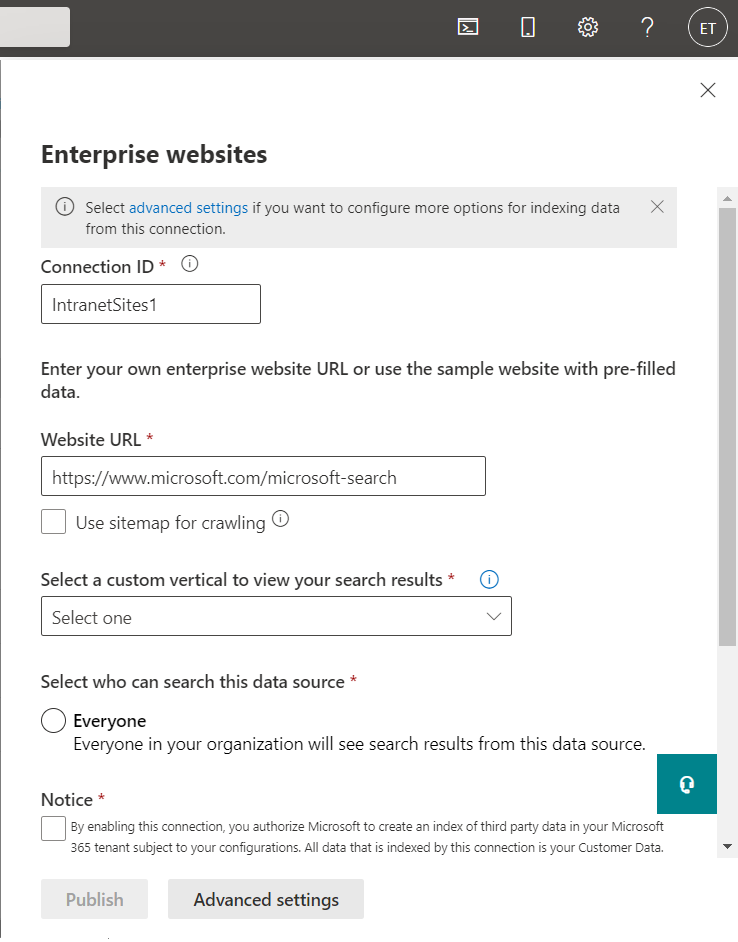
Microsoft Graph connectors have introduced a simplified setup process to configure the Enterprise Websites connector. Admins can now try out Graph connectors much more easily using this simplified flow. Some improvements made to the setup process include –
To help create better boundaries and protect personal time, Viva Insights will offer the ability to configure quiet time to silence notifications from Outlook and Teams mobile applications, outside of working hours. Users will receive personalized insights through the Viva Insights app in Teams and will be able to set quiet time directly from Teams mobile and Outlook mobile applications.
This message is associated with Microsoft 365 Roadmap ID: 85627

These updates include our new Assignments web part for Education customers and changes to other web parts like Group calendar, Quick links, and Highlighted content. We’re also introducing a new SharePoint site theme.
Note: Most of these changes are being released as part of Teams Class Home page release.
The Briefing email from Microsoft Viva helps users start their day on track by surfacing information to prepare for upcoming meetings, follow up on outstanding tasks as well as protect time for independent work. A few updates are coming to the daily briefing email to provide users with ways to fine-tune their email.
Favorite & Snooze
You can now configure the availability of attendance report on Teams Mobile for users in your tenant, who can check attendance information for regular meetings or webinars and also the registration information before webinars on Microsoft Teams for Android and iOS as they can do on desktop today.
This message is associated with Microsoft 365 Roadmap ID 97466
In Microsoft Teams, we will be releasing a feature that allows meeting organizers to transcribe meetings automatically if the meeting has been set to be recorded.
This will make the recording playback experience accessible.

I've been working with Microsoft Technologies over the last ten years, mainly focused on creating collaboration and productivity solutions that drive the adoption of Microsoft Modern Workplace.